
Workflow
File Explorer workspace
A visual guide to the DrowAI File Explorer tab for reviewing task workspace files and artifacts.
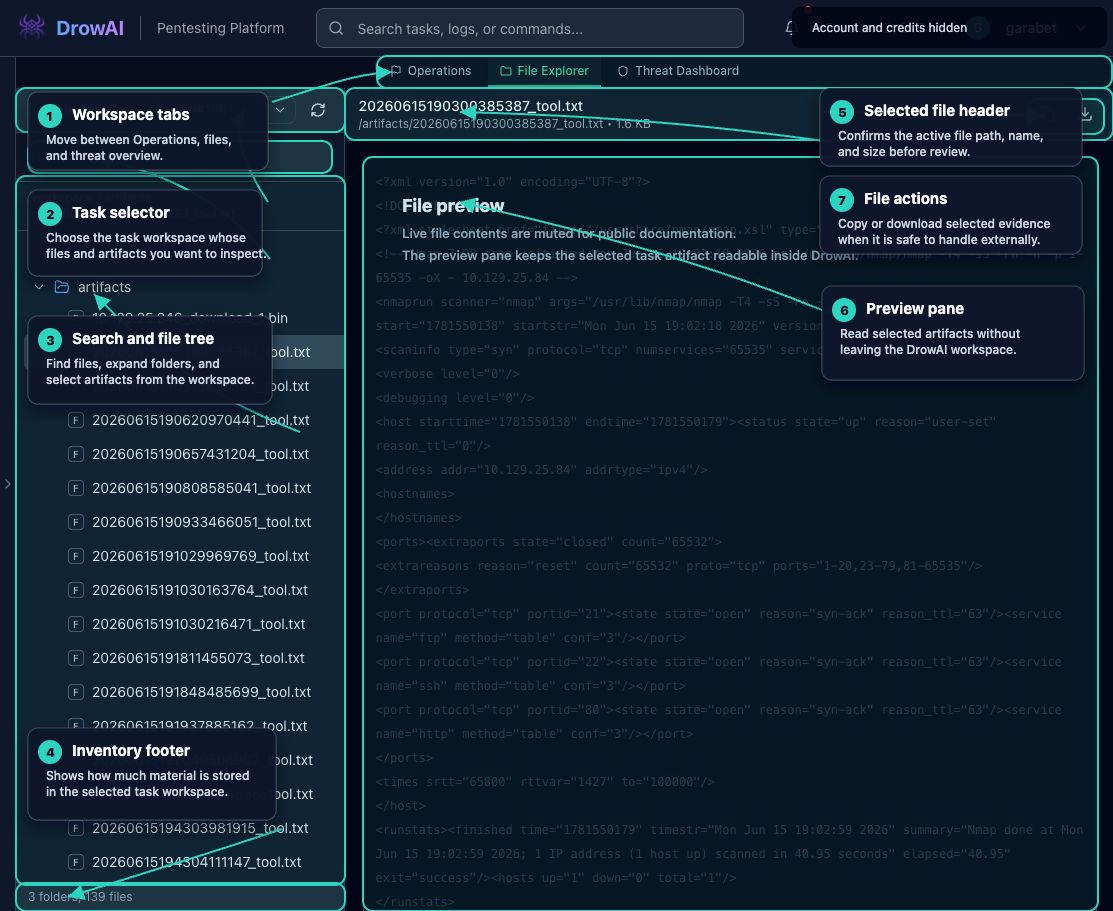
The File Explorer tab gives operators a task-scoped view of workspace files, tool outputs, and artifacts. It is useful when reviewing saved outputs, confirming what material was created during a task, and downloading files that should be retained outside the task workspace.
Primary regions
- Workspace tabs switch between Operations, File Explorer, and Threat Dashboard.
- The task selector chooses which task workspace is currently being inspected.
- Search narrows the tree by file name, and folder controls expand or collapse workspace paths.
- Selection checkboxes support multi-file download as a ZIP when files are available.
- The breadcrumb confirms the current workspace path.
- The inventory footer summarizes how many files and folders are available.
- The selected file header confirms the file path, name, and size.
- File actions support copying a path or downloading the selected file.
- The preview pane displays Markdown, JSON, XML, text, or a binary-file fallback without leaving DrowAI.
How to use it
Start by choosing a task. Use the tree for browsing and search when you know a filename or artifact name. Select a file to preview it on the right. Use downloads for material that should be attached to a report draft, handed off for review, or preserved outside the running task.
File Explorer only shows files for the selected task workspace. It is not a general file browser for the host machine.
Public-safe handling
File previews can contain target details, tool output, credentials, or other sensitive assessment material. Public documentation should show the layout and workflow while masking live file contents and account details.