
Knowledge
Assets workspace
A visual guide to the DrowAI Knowledge Assets tab for reviewing observed hosts and related context.
The Assets tab is part of the DrowAI Knowledge workspace. It helps operators review observed assets, understand risk state, and move from an asset row into linked services, findings, and evidence-backed context.
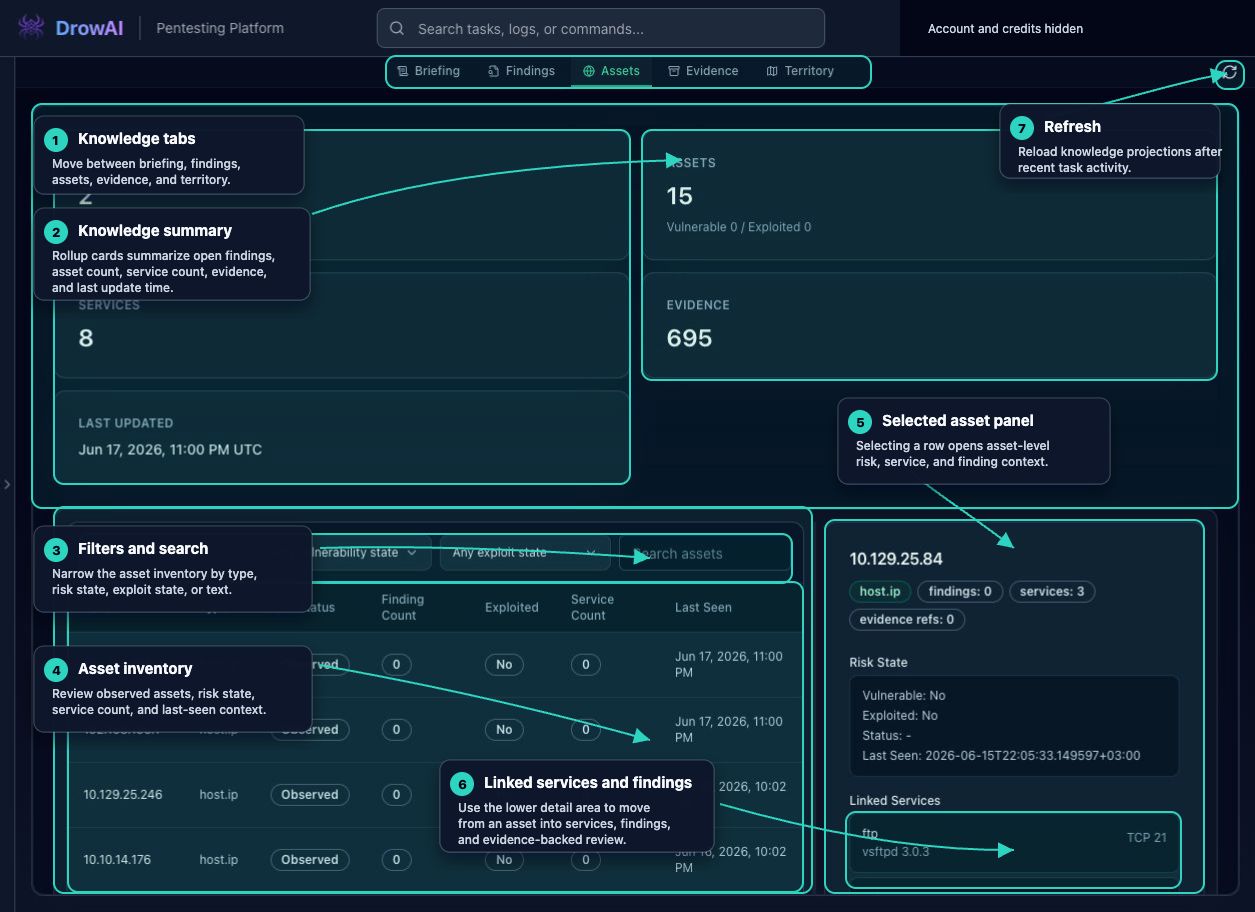
Primary regions
- Knowledge tabs switch between Briefing, Findings, Assets, Evidence, and Territory.
- Summary cards show current knowledge totals above the active tab.
- Filters narrow the asset inventory by asset type, vulnerability state, exploit state, or search text.
- The asset inventory lists observed assets with type, risk status, finding count, exploit state, service count, and last-seen time.
- Selecting an asset opens the detail panel.
- The detail panel shows risk state, host intelligence when available, linked services, linked findings, and evidence preview entry points.
- Refresh reloads knowledge projections after recent task activity.
Review habit
Use Assets to answer “what did DrowAI observe?” and “what context is attached to this thing?” It is a review surface. Confirm important asset details against evidence before using them as final report claims.
Public-safe handling
Asset views can contain real hosts, internal ranges, service names, and assessment timing. Public documentation should explain the workflow while masking live host identifiers and sensitive service details.