
One mission-level security workspace
An engagement represents a full authorized red-team or pentest effort, keeping scope, targets, tasks, evidence, and outcomes together.
Overview
DrowAI helps an operator run scoped security tasks with a guided agent, isolated Kali execution, structured evidence, and engagement-ready reporting in one workspace.
Workflow
An engagement represents a full authorized red-team or pentest effort, keeping scope, targets, tasks, evidence, and outcomes together.
Tasks break a larger engagement into specific objectives, so the operator and agent can work through separate lines of investigation without losing context.
As the agent works, DrowAI turns collected activity into durable records for assets, services, evidence, findings, relationships, and reporting.
Knowledge workspace
DrowAI keeps findings, assets, services, evidence, and network territory connected in one inspectable workspace, so an operator can move from raw activity to a defensible security picture.
Territory
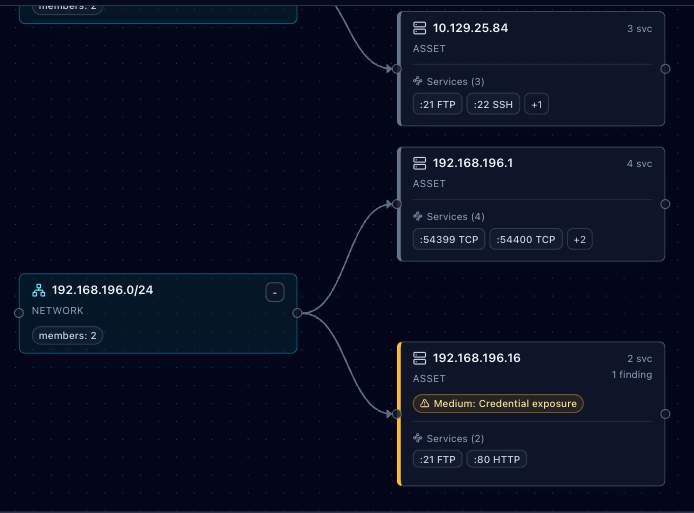
Network territory, selected asset context, and linked finding state.
Scope, targets, and rules.
A focused goal to pursue.
Plans, reasons, and guides.
Isolated tool execution.
Linked assets and evidence.
Report-ready findings.
Product workflow
Agent capabilities
The runtime includes more than 100 Kali tools, but only the capabilities listed here are currently fully integrated and available to the LLM.
Read, search, create, edit, copy, move, and remove files and directories inside the task workspace.
Use fping, Nmap, and bounded network checks to identify reachable hosts, open services, and network details.
Make HTTP requests, download web content, and use FFUF to discover paths and web application content.
Search, inspect, and run supported Metasploit modules within the task's authorized scope.
Log into supplied FTP and SSH services, list remote files, and download single files for review.
Use TShark to inspect packet captures and identify relevant network traffic for task review.